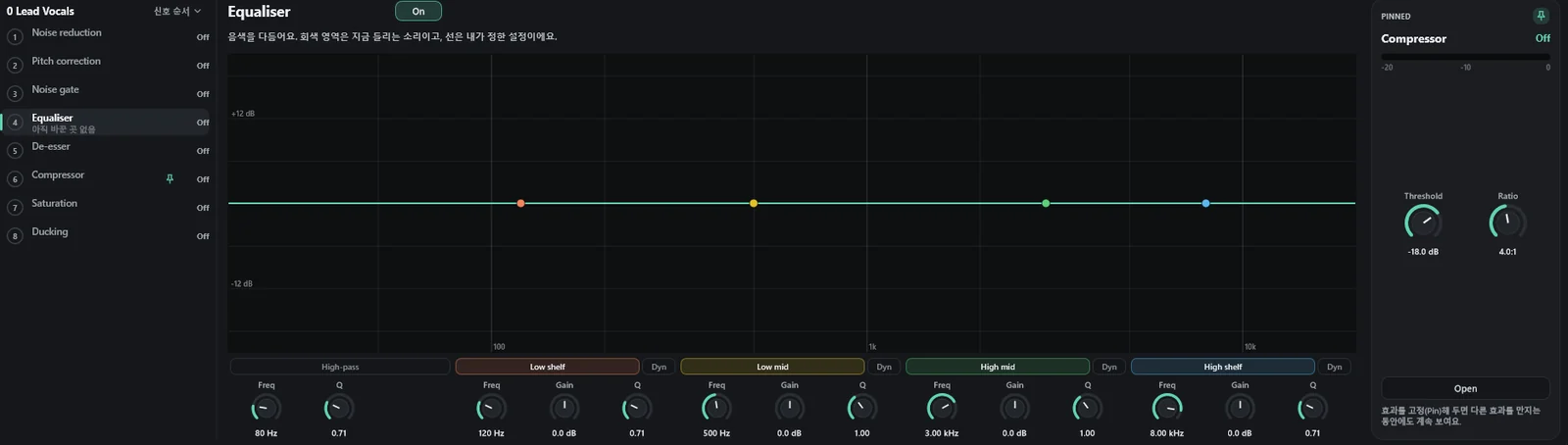
노브에 마우스만 올리면 뭘 하는지 알려줘요. 장르 프리셋을 누르면 곡을 분석해서 시작값을 잡아주고, 버튼 하나로 유튜브·스포티파이·애플뮤직 음량 기준에 맞춰줘요. DAW도, 플러그인도, 구독도 필요 없어요.
Hover any knob and it tells you what it does. A genre preset analyzes your song and sets sensible starting points, and one button matches YouTube, Spotify or Apple Music loudness. No DAW, no plug‑ins, no subscription.
출시 기념가 29,000원 39,000원 · 한 번 결제, 평생 사용
Launch price $19 $29 · Pay once, keep it forever
PanKnobby는 노브 하나하나가 무슨 일을 하는지 먼저 알려줘요. 처음이어도 바로 시작할 수 있어요.
PanKnobby tells you what every knob does before you touch it, so anyone can start right away.
"이 노브 돌리면 뭐가 바뀌는 거지…?"
"What does this knob even do?"
노브에 마우스를 올리면 무슨 역할인지, 어느 방향으로 돌리면 어떻게 되는지 바로 떠요. 검색창 열 필요가 없어요.
Hover a knob to see what it does and which way to turn it. No more searching forums mid‑mix.
"어디서부터 시작해야 할지 모르겠어"
"I don't know where to start."
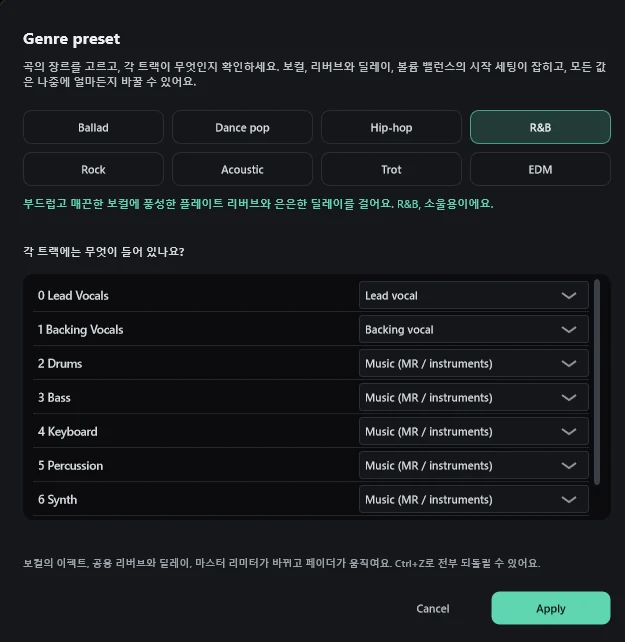
장르만 고르면 실제 트랙을 분석해서 보컬 EQ·컴프·리버브까지 출발점을 잡아줘요. 마음에 안 들면 Ctrl+Z.
Pick a genre and it analyzes your actual tracks to set vocal EQ, compression and reverb. Don't like it? Ctrl+Z.
"올렸더니 다른 곡보다 작게 들려"
"My upload sounds quieter than everything else."
유튜브·스포티파이·애플뮤직 등 플랫폼을 고르면 기준 음량에 맞춰 줘요. 피크도 안전하게 잡아요.
Choose YouTube, Spotify, Apple Music and more and it hits that platform's loudness target with safe peaks.
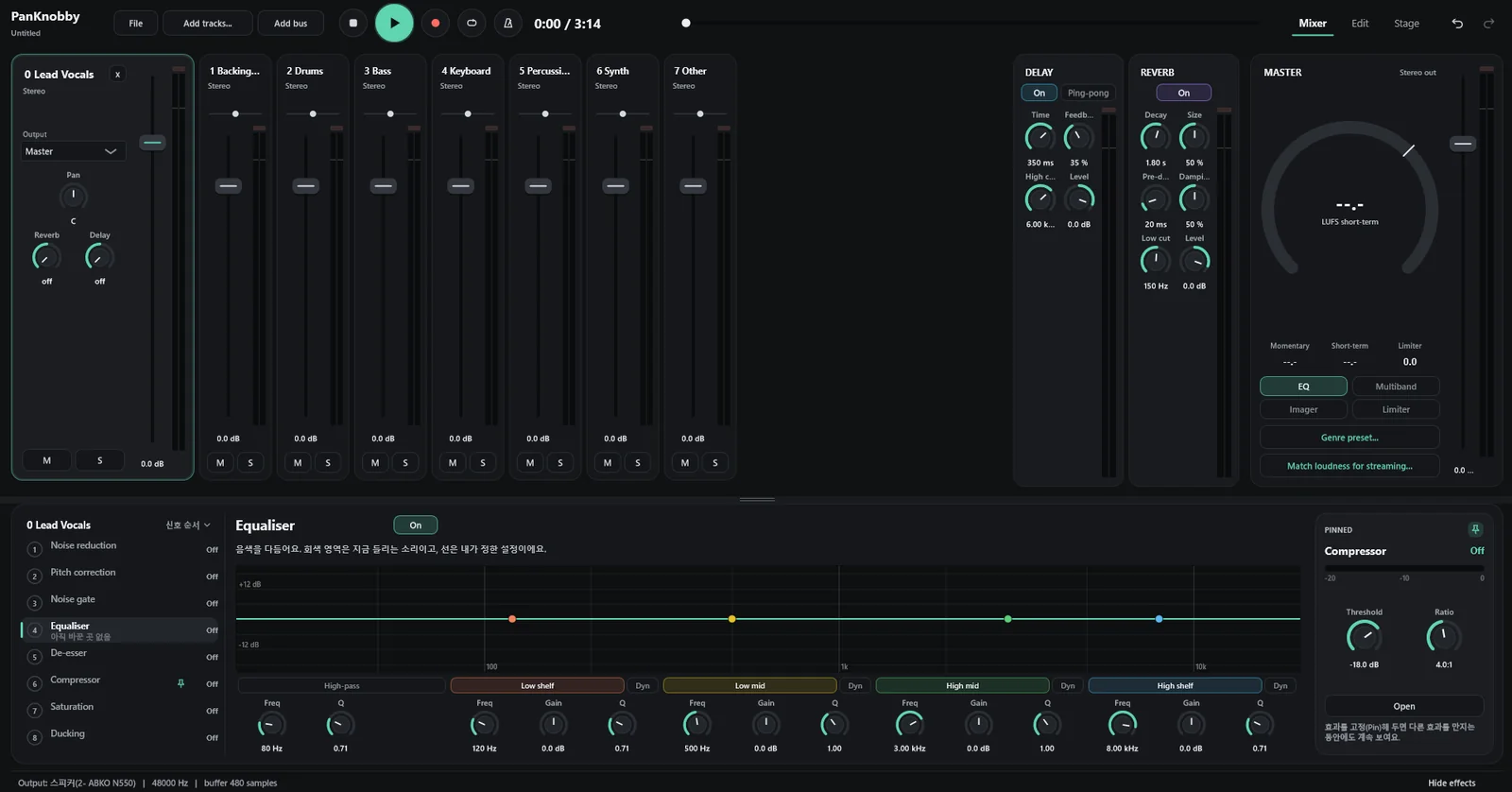
트랙마다 효과가 쓰는 순서대로 줄 서 있어요. 노이즈 제거 → 피치 보정 → 게이트 → EQ → 디에서 → 컴프 → 새츄레이션 → 더킹. 위에서부터 하나씩 켜기만 하면 돼요.
Every track's effects are lined up in the order you'd actually use them: noise reduction → pitch → gate → EQ → de‑esser → compressor → saturation → ducking. Just switch them on, top to bottom.

보통 프리셋은 정해진 값을 그대로 덮어써요. PanKnobby는 내 곡의 실제 트랙을 분석해서 시작값을 계산해요.
Most presets just paste in fixed numbers. PanKnobby analyzes your actual tracks and calculates the starting points.

장르를 고르고, 트랙마다 무엇이 들어 있는지만 확인하면 끝
Pick a genre, confirm what's on each track, and you're done
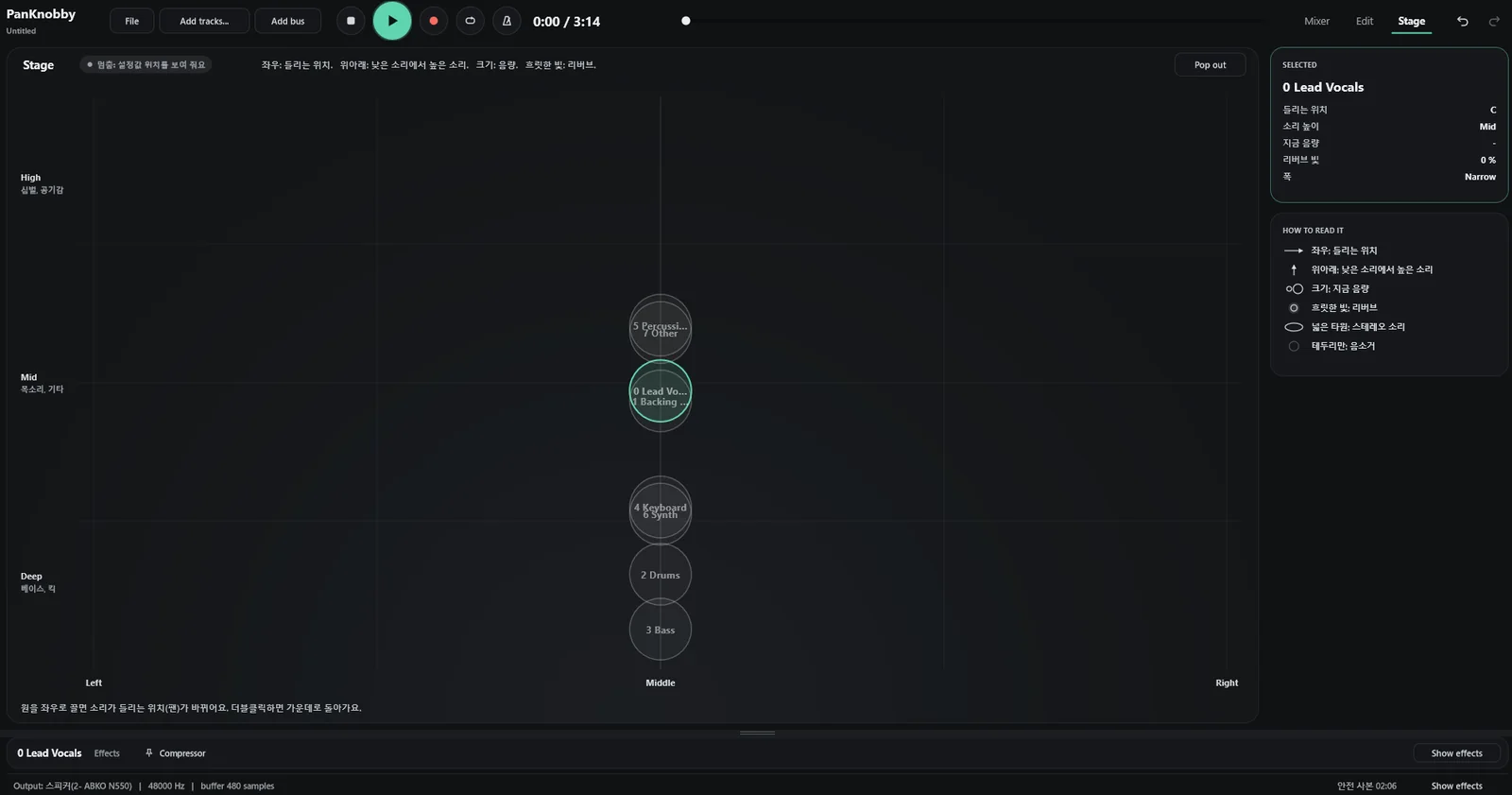
좌우는 들리는 위치, 위아래는 낮은 소리·높은 소리, 원 크기는 음량, 흐릿함은 리버브. 공을 좌우로 끌기만 하면 들리는 위치(팬)가 바로 바뀌어요.
Left–right is where you hear it, up–down is low vs high, size is volume, blur is reverb. Drag a ball left or right and it pans instantly.

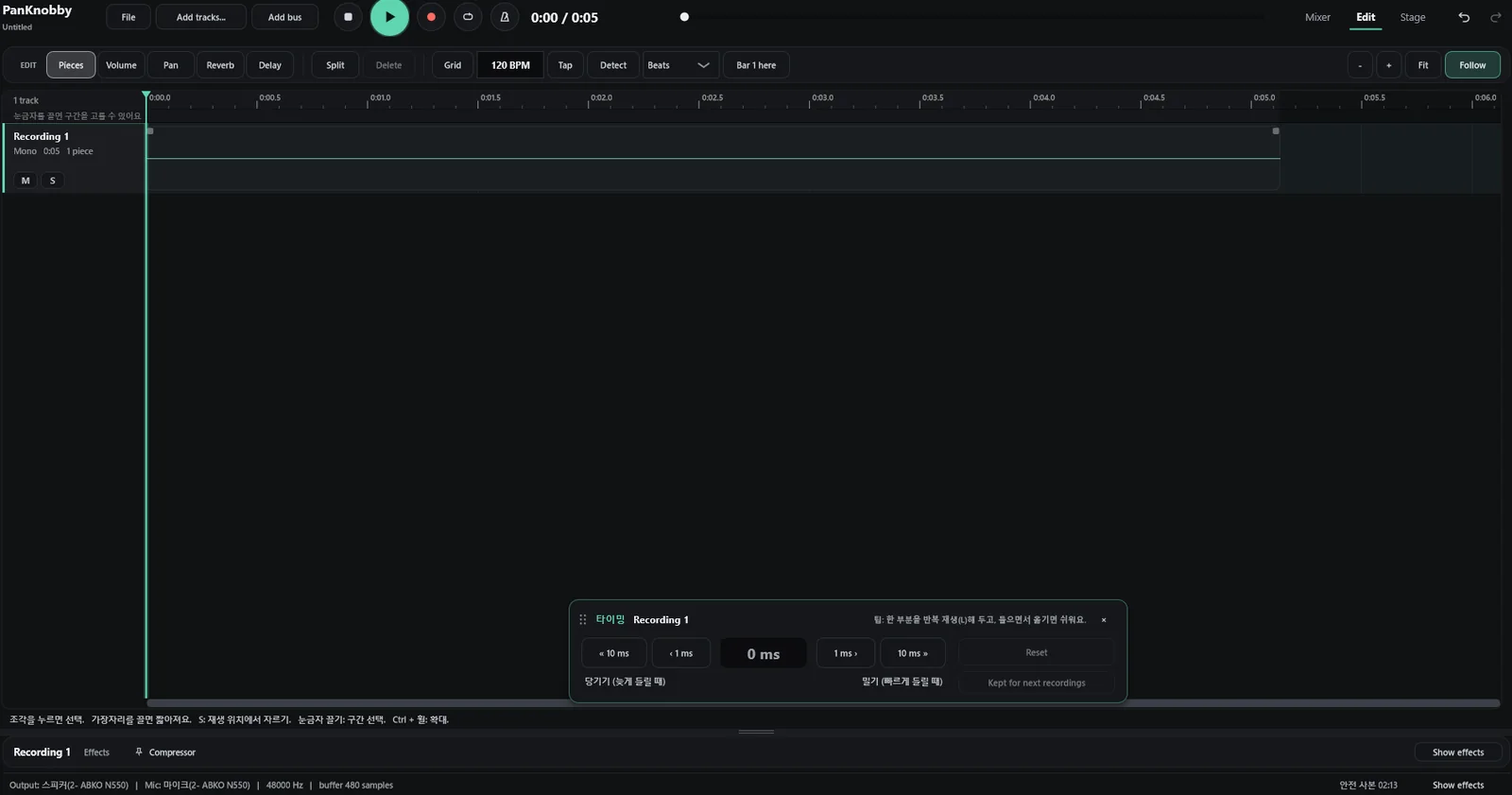
USB 마이크·오디오 인터페이스는 기기마다 미세한 지연이 있어요. PanKnobby는 1ms 단위로 맞추고, 마이크별로 기억해서 다음 녹음부터 자동으로 적용해요.
Every USB mic and interface adds a little delay. PanKnobby lets you nudge timing in 1 ms steps and remembers it per mic, so every next take lines up automatically.

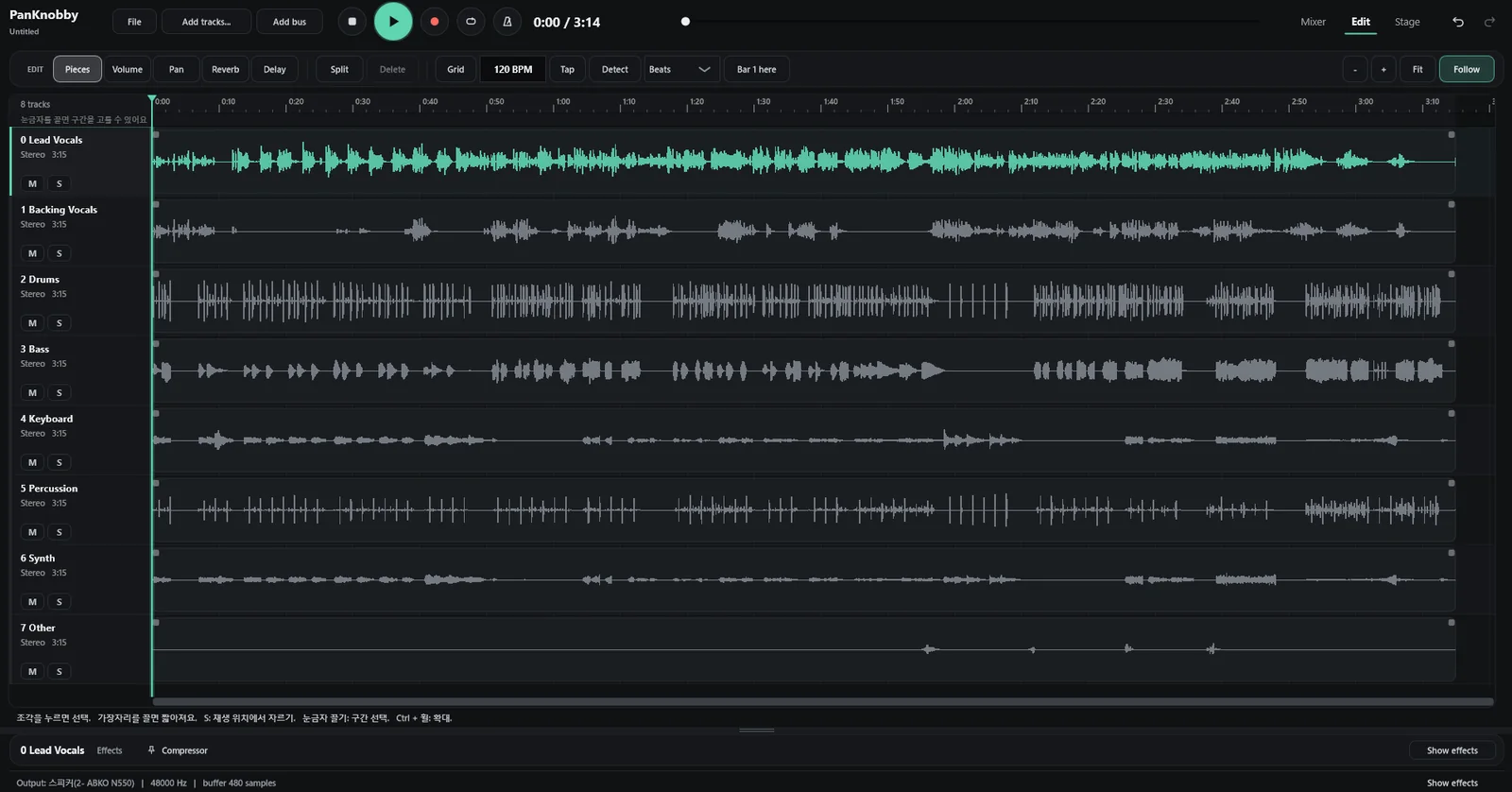
자르고, 옮기고, 볼륨·팬·리버브·딜레이를 선으로 그려도 괜찮아요.
원본 파일은 그대로. 언제든 되돌릴 수 있어요.
Split, move, and draw volume, pan, reverb and delay lines as much as you like.
Your original files stay untouched. Undo anything, anytime.

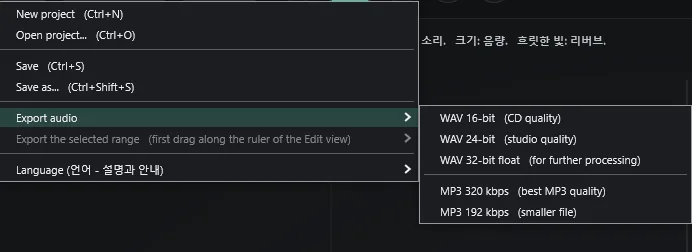
음원 유통·유튜브용 WAV부터 공유용 MP3까지. 편집 화면에서 구간을 골라 그 부분만 내보낼 수도 있어요.
WAV for distribution and YouTube, MP3 for sharing. Select a range in the Edit view to export just that part.

자동 / 학습 모드, 지워진 소리만 따로 들어보기
Auto or Learn mode, plus "hear what was removed"
곡 키 자동 감지, 인터넷 없이 내 PC에서 계산
Auto key detection, processed offline on your PC
숨소리·잡음 사이 구간 정리
Cleans up breaths and hiss between phrases
다이내믹 밴드 지원
With dynamic bands
쉬·츠 같은 치찰음 다듬기
Tames harsh "s" sounds
보컬을 앞으로, 따뜻하게
Bring vocals forward and add warmth
노래할 때 반주가 살짝 비켜줌
Backing steps aside when the vocal comes in
BPM 싱크, 핑퐁 딜레이
BPM sync, ping‑pong delay
EQ · 멀티밴드 · 이미저 · 리미터
EQ · multiband · imager · limiter
순간 · 단기 · 통합 음량 표시
Momentary, short‑term, integrated
볼륨 · 팬 · 리버브 · 딜레이 라인
Volume, pan, reverb and delay lines
프로그램 안에서 따라 하는 사용법
Interactive walkthrough inside the app
유명 AI 어시스턴트 플러그인과 전문가용 프로그램은 훌륭하지만, 하나에 수십만 원이에요. 게다가 플러그인은 DAW가 따로 있어야 돌아가요.
Well‑known AI assistant plug‑ins and pro software are excellent, but each one costs hundreds of dollars, and plug‑ins also need a separate DAW to run in.
| 구성 | Option | 무엇을 하나 | What it covers | 가격 | Price |
|---|---|---|---|---|---|
| 유명 AI 어시스턴트 플러그인 · DAW 별도 필요POPULAR AI ASSISTANT PLUG‑INS · DAW REQUIRED | |||||
| AI 마스터링 플러그인 (Standard 등급) | AI mastering plug‑in (Standard tier) | 마스터링 | Mastering | 약 29만 원$219$219 | |
| AI 믹싱 어시스턴트 플러그인 | AI mixing‑assistant plug‑in | 믹싱 도구 묶음 | Mixing toolkit | 약 40만 원$299$299 | |
| AI 보컬 체인 플러그인 (Standard 등급) | AI vocal‑chain plug‑in (Standard tier) | 보컬 처리 | Vocal processing | 약 26만 원$199$199 | |
| AI 오디오 복구·노이즈 제거 플러그인 (Standard 등급) | AI audio repair & noise‑removal plug‑in (Standard tier) | 잡음·노이즈 제거 | Noise & repair | 약 53만 원$399$399 | |
| 인기 피치 보정 플러그인 (중급 에디션) | Popular pitch‑correction plug‑in (mid edition) | 음정 보정 | Pitch correction | 약 33만 원$249$249 | |
| 현재 많이 쓰는 작업 프로그램 (DAW)DAWS PEOPLE USE TODAY | |||||
| 업계 표준 DAW (구독형) | Industry‑standard DAW (subscription) | 녹음·편집·믹싱 · 매년 결제 | Record, edit, mix · billed yearly | 약 40만 원 / 년$299 / 년$299 / year | |
| 인기 전문가용 DAW (최상위 에디션) | Popular pro DAW (top edition) | 녹음·편집·믹싱 · 기능이 많아 배우기 어려움 | Record, edit, mix · steep learning curve | 약 77만~100만 원$580~$749$580–$749 | |
| 가성비 DAW (개인 라이선스) | Budget DAW (personal license) | 녹음·편집 · 자동 세팅·설명 없음 | Record & edit · no guided setup | 약 8만 원$60$60 | |
| PanKnobby | 녹음 · 편집 · 믹싱 · 마스터링 · 노이즈 제거 · 피치 보정 · 스트리밍 음량 · 설명 툴팁 전부 | Record · edit · mix · master · noise removal · pitch correction · streaming loudness · hover help — all of it | |||
* 2026년 11월 기준, 각 제조사 공식 스토어 가격이에요(할인 행사 제외, 세금 별도). 원화는 1달러 = 약 1,330원(2026년 11월 20일 한국수출입은행 고시)으로 환산한 참고 금액이에요. 가격과 환율은 수시로 바뀔 수 있어요.
* Official manufacturer store prices as of November 2026, excluding promotions and tax. Prices change over time.
구독 없음. 매달 나가는 돈 없음.
No subscription. Nothing monthly.
1회 결제 · 평생 사용
One‑time payment · lifetime license
Windows 11 (64비트) · 첫 인증 시 인터넷 필요, 이후 30일까지 오프라인 사용 가능
결제가 확인되면 영업일 기준 3일 이내에 이메일로 라이선스 키가 발송돼요.
Windows 11 (64‑bit) · Internet needed to activate; then works offline for up to 30 days at a time
Your license key arrives by email within 3 business days after payment is confirmed.
PanKnobby는 1인 개발자가 직접 만들고 다듬어요. 써 보면서 불편했던 점, 있었으면 하는 기능, 사소한 아이디어까지 언제든 환영해요. 보내주신 의견은 하나하나 읽고, 다음 업데이트를 정할 때 가장 먼저 참고해요.
PanKnobby is built and polished by an independent developer. Annoyances, feature wishes, even small ideas: they're always welcome. Every message gets read, and it's the first thing considered when planning the next update.
1.x 버전 안의 기능 추가·개선·버그 수정은 전부 무료예요.
Every feature, improvement and fix within 1.x is free.
2.0이 나오면 기존 구매자는 할인된 가격으로 업그레이드할 수 있어요. 업그레이드하지 않아도 지금 쓰던 1.x는 그대로 쓸 수 있어요.
If a 2.0 comes out, existing owners can upgrade at a discount. If you don't upgrade, your 1.x keeps working.
쓰면서 불편했던 점이나 바라는 기능은 support@panknobby.com으로 보내 주세요.
Something annoying, or a feature you'd like? Email support@panknobby.com.
지금은 Windows 11 (64비트)에서 사용할 수 있어요. 맥(Mac) 버전도 추후 출시할 예정이에요.
공식 지원은 Windows 11이에요. Windows 10에서도 실행될 수는 있지만, 동작을 보장하지는 않아요.
설치형 체험판은 아직 없어요. 대신 인터랙티브 사용 가이드에서 데모를 재생하고 직접 조작해 보면서 기능과 소리 변화를 확인한 뒤 결정하실 수 있어요. 그리고 구매 후 14일 안에는 이유를 묻지 않고 전액 환불해 드려요. 자세한 내용은 환불 정책을 확인해 주세요.
아니요. PanKnobby 하나만 설치하면 녹음부터 내보내기까지 다 돼요.
처음 라이선스 인증할 때만 필요해요. 그 뒤로는 최대 30일까지 인터넷 없이 쓸 수 있고, 연결되면 자동으로 갱신돼요. 소리 처리(피치 보정 포함)는 전부 내 PC 안에서 해요.
라이선스 1개는 PC 1대에서 쓸 수 있어요. PC를 바꾸시면 메일로 알려주세요. 이전 PC 등록을 해제하고 새 PC에서 쓸 수 있게 도와드려요.
네, 상업적으로 사용해도 문제없어요. PanKnobby에는 결과물에 섞이는 샘플이나 소리 자료가 따로 들어 있지 않고, 만든 결과물에 대해 어떤 권리도 주장하지 않아요. 유튜브 수익 창출, 음원 유통 모두 자유롭게 하세요. 단, 커버곡처럼 다른 사람의 곡을 부른 경우에는 원곡의 저작권을 따로 확인해야 해요.
네. File → Language에서 한국어를 고르면 노브 설명과 안내 문구가 한국어로 나와요. 메뉴·버튼 이름은 믹싱에서 실제로 쓰는 영어 용어 그대로예요. 앞으로 다른 언어도 계속 추가할 예정이에요.
결제가 확인되면 영업일 기준 3일 이내에 이메일로 라이선스 키를 보내드려요. 보통은 그보다 빨리 받으실 수 있어요.
Right now PanKnobby runs on Windows 11 (64‑bit). A Mac version is planned for a future release.
PanKnobby officially supports Windows 11. It may run on Windows 10, but we can't guarantee it works there.
There's no installable trial yet. Instead, our interactive guide lets you play demos and try the controls yourself, so you can hear what each feature does before you buy. And if it's not for you, you get a full refund within 14 days, no questions asked. See the refund policy for details.
No. PanKnobby is a standalone app — recording to export, all in one.
Only to activate. After that it runs offline for up to 30 days at a time and renews automatically when you're online. All audio processing, including pitch correction, happens on your PC.
One license covers one PC. Email us and we'll release the old PC so you can activate on the new one.
Yes, commercial use is fine. PanKnobby adds no samples or sound content of its own to your audio and claims no rights over what you make, so monetized YouTube videos and streaming releases are all yours. If you record a cover, the original song's copyright still needs to be cleared separately.
Menus and buttons use the standard English mixing terms. Hover help and on‑screen guidance are available in English and Korean (File → Language). More languages will be added in future updates.
Your license key is emailed to you within 3 business days after payment is confirmed, usually sooner.
녹음부터 스트리밍용 마스터까지, PanKnobby 하나면 충분해요.
From the first take to a streaming‑ready master, PanKnobby is all you need.
출시 기념가는 한정 기간에만 적용돼요.
Launch pricing is for a limited time.